GE
IS220PDOAH1A
$4000
In Stock
T/T
Xiamen
| Availability: | |
|---|---|
| Quantity: | |
The IS220PDOAH1A is a Discrete Output I/O module used in GE's Mark VIe and Mark VIeS Control Systems, representing a specific hardware version within the PDOA series. This module is primarily used in industrial automation and control systems to enable remote control and status monitoring of relay devices. The IS220PDOAH1A module incorporates a BPPB processor board, providing robust signal processing and communication capabilities, making it suitable for high-reliability industrial applications such as gas turbines, steam turbines, wind power generation, and process control.
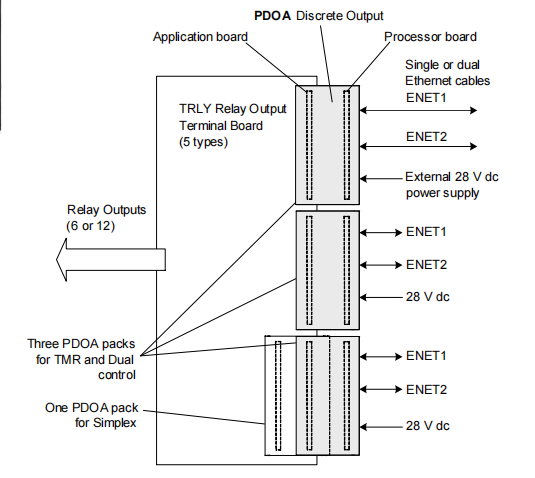
The module connects to the control system network (IONet) via dual Ethernet interfaces, supporting redundant network communication to ensure high data availability. Its output channels can control up to 12 relays and include comprehensive functions such as relay driving, status feedback, fuse monitoring, and self-diagnostics, meeting the configuration requirements for both Simplex and TMR (Triple Modular Redundant) systems.
The IS220PDOAH1A module consists of two core printed circuit boards:
BPPB Processor Board: Responsible for communication protocol handling, logic control, self-diagnostics, and data reporting.
Acquisition Board: Dedicated to driving discrete output signals and acquiring feedback, providing functions like level shifting, current monitoring, and relay driving.
DC-37 Pin Connector: Located on the underside of the module, used for direct connection to relay terminal boards (e.g., TRLY series).
Dual RJ-45 Ethernet Ports (ENET1, ENET2): Support redundant network connections. ENET1 is typically connected to the primary controller network.
3-pin External Power Input: Accepts 28 V DC power to supply the module and the terminal board.
Dimensions: 8.26 cm (H) × 4.19 cm (W) × 12.1 cm (D)
Mounting Method: Plugs directly into the terminal board and is secured using threaded studs to prevent side-force on the connector.
The IS220PDOAH1A receives command signals via Ethernet from the controller and outputs relay drive signals through its internal acquisition board. Each output channel uses an open-collector transistor circuit with current monitoring capability to detect whether the relay has picked up correctly and is connected to a load. When an output is activated:
The corresponding yellow status indicator (LEDs 1–12) illuminates.
The current monitor circuit detects load current, and the feedback signal becomes TRUE.
If no current is detected, the indicator remains off, the feedback is FALSE, and the system can identify an output fault.
During initial power-up, all outputs are automatically disabled until the following self-tests are completed:
RAM and Flash memory checks
Ethernet port detection
Processor hardware self-test
Power supply monitoring
An Enable Line activates the outputs only after all conditions are met, ensuring relays remain de-energized during system initialization to prevent misoperation.
The IS220PDOAH1A features 15 inverting level-shifting monitor input circuits used to acquire the following feedback signals:
12 Relay Contact Feedback channels
3 Fuse Status Feedback channels
Additionally, the module supports feedback multiplexing control, allowing it to read two sets of 15 signals from the terminal board via a control line for comprehensive monitoring of complex terminal board states.
Each relay channel can be configured to generate an SOE record upon a state change, used for fault analysis and system behavior tracing. It is recommended to prioritize using relay feedback signals (rather than output commands) as the SOE source for improved accuracy.
This function is specific to GE industrial applications and requires coordination with a PGEN module to monitor power load status and prevent system faults caused by load imbalance. Detailed descriptions can be found in the GEH-6721_Vol_III manual.
The IS220PDOAH1A supports various relay output terminal boards, including:
| Terminal Board Model | Simplex | TMR | Notes |
|---|---|---|---|
| TRLYH1B, S1B | Yes | Yes | Electromechanical, with coil sensing |
| TRLYH1C | No | Yes | Electromechanical, with contact sensing |
| TRLYH2C | Yes | Yes | |
| TRLYH1D, S1D | No | Yes | With solenoid integrity sensing |
| TRLYH1E, 2E, 3E | No | Yes | Solid-State Relays |
Note: Simplex systems use 1 PDOA module; TMR systems use 3 modules.
Supports the ControlST software suite V04.04 and later
Configuration, parameter setting, and diagnostics can be performed using the ToolboxST application
Mount the Terminal Board: Securely install the selected relay terminal board.
Plug in the PDOA Module: Insert the module directly into the terminal board's DC-37 connector.
Mechanically Secure: Use the threaded studs adjacent to the Ethernet ports to secure the module to the mounting bracket.
Connect Network:
Simplex: Connect one or two Ethernet cables.
TMR: Connect one cable per module; typically connect ENET1 to the R controller network.
Apply Power: Plug in the 28 V DC power connector. The module has soft-start capability, so power does not need to be removed before connection.
Software Configuration: Use ToolboxST to configure module parameters such as relay enable, SOE recording, and fuse diagnostics.
The IS220PDOAH1A continuously performs the following self-checks during operation:
Power supply monitoring
Processor and memory checks
Ethernet communication status
Comparison between relay command and feedback states
Verification of terminal board electronic ID
Fuse status reading
Yellow LEDs 1–12: Indicate whether each relay output is commanded to energize.
Processor LEDs: Display module communication, power, fault, and other statuses (refer to Common Module documentation).
| Alarm Code | Description | Recommended Action |
|---|---|---|
| 33-129 | Signal Voting Mismatch (TMR systems) | Check R/S/T module configuration, power, network, mounting |
| 130-141 | Relay Circuit Fuse(s) Blown | Check fuses, terminal board power, configuration, connections |
| 143-154 | Relay Coil State does not match Command | Check output circuit, load, terminal board power |
| 155-166 | NO Contact Voltage disagrees with Command | Check external voltage, terminal board config/connections |
| 191 | TRLY_F Board configured for Simplex error | Change redundancy configuration to TMR in ToolboxST |
The IS220PDOAH1A is a Discrete Output I/O module used in GE's Mark VIe and Mark VIeS Control Systems, representing a specific hardware version within the PDOA series. This module is primarily used in industrial automation and control systems to enable remote control and status monitoring of relay devices. The IS220PDOAH1A module incorporates a BPPB processor board, providing robust signal processing and communication capabilities, making it suitable for high-reliability industrial applications such as gas turbines, steam turbines, wind power generation, and process control.
The module connects to the control system network (IONet) via dual Ethernet interfaces, supporting redundant network communication to ensure high data availability. Its output channels can control up to 12 relays and include comprehensive functions such as relay driving, status feedback, fuse monitoring, and self-diagnostics, meeting the configuration requirements for both Simplex and TMR (Triple Modular Redundant) systems.
The IS220PDOAH1A module consists of two core printed circuit boards:
BPPB Processor Board: Responsible for communication protocol handling, logic control, self-diagnostics, and data reporting.
Acquisition Board: Dedicated to driving discrete output signals and acquiring feedback, providing functions like level shifting, current monitoring, and relay driving.
DC-37 Pin Connector: Located on the underside of the module, used for direct connection to relay terminal boards (e.g., TRLY series).
Dual RJ-45 Ethernet Ports (ENET1, ENET2): Support redundant network connections. ENET1 is typically connected to the primary controller network.
3-pin External Power Input: Accepts 28 V DC power to supply the module and the terminal board.
Dimensions: 8.26 cm (H) × 4.19 cm (W) × 12.1 cm (D)
Mounting Method: Plugs directly into the terminal board and is secured using threaded studs to prevent side-force on the connector.
The IS220PDOAH1A receives command signals via Ethernet from the controller and outputs relay drive signals through its internal acquisition board. Each output channel uses an open-collector transistor circuit with current monitoring capability to detect whether the relay has picked up correctly and is connected to a load. When an output is activated:
The corresponding yellow status indicator (LEDs 1–12) illuminates.
The current monitor circuit detects load current, and the feedback signal becomes TRUE.
If no current is detected, the indicator remains off, the feedback is FALSE, and the system can identify an output fault.
During initial power-up, all outputs are automatically disabled until the following self-tests are completed:
RAM and Flash memory checks
Ethernet port detection
Processor hardware self-test
Power supply monitoring
An Enable Line activates the outputs only after all conditions are met, ensuring relays remain de-energized during system initialization to prevent misoperation.
The IS220PDOAH1A features 15 inverting level-shifting monitor input circuits used to acquire the following feedback signals:
12 Relay Contact Feedback channels
3 Fuse Status Feedback channels
Additionally, the module supports feedback multiplexing control, allowing it to read two sets of 15 signals from the terminal board via a control line for comprehensive monitoring of complex terminal board states.
Each relay channel can be configured to generate an SOE record upon a state change, used for fault analysis and system behavior tracing. It is recommended to prioritize using relay feedback signals (rather than output commands) as the SOE source for improved accuracy.
This function is specific to GE industrial applications and requires coordination with a PGEN module to monitor power load status and prevent system faults caused by load imbalance. Detailed descriptions can be found in the GEH-6721_Vol_III manual.
The IS220PDOAH1A supports various relay output terminal boards, including:
| Terminal Board Model | Simplex | TMR | Notes |
|---|---|---|---|
| TRLYH1B, S1B | Yes | Yes | Electromechanical, with coil sensing |
| TRLYH1C | No | Yes | Electromechanical, with contact sensing |
| TRLYH2C | Yes | Yes | |
| TRLYH1D, S1D | No | Yes | With solenoid integrity sensing |
| TRLYH1E, 2E, 3E | No | Yes | Solid-State Relays |
Note: Simplex systems use 1 PDOA module; TMR systems use 3 modules.
Supports the ControlST software suite V04.04 and later
Configuration, parameter setting, and diagnostics can be performed using the ToolboxST application
Mount the Terminal Board: Securely install the selected relay terminal board.
Plug in the PDOA Module: Insert the module directly into the terminal board's DC-37 connector.
Mechanically Secure: Use the threaded studs adjacent to the Ethernet ports to secure the module to the mounting bracket.
Connect Network:
Simplex: Connect one or two Ethernet cables.
TMR: Connect one cable per module; typically connect ENET1 to the R controller network.
Apply Power: Plug in the 28 V DC power connector. The module has soft-start capability, so power does not need to be removed before connection.
Software Configuration: Use ToolboxST to configure module parameters such as relay enable, SOE recording, and fuse diagnostics.
The IS220PDOAH1A continuously performs the following self-checks during operation:
Power supply monitoring
Processor and memory checks
Ethernet communication status
Comparison between relay command and feedback states
Verification of terminal board electronic ID
Fuse status reading
Yellow LEDs 1–12: Indicate whether each relay output is commanded to energize.
Processor LEDs: Display module communication, power, fault, and other statuses (refer to Common Module documentation).
| Alarm Code | Description | Recommended Action |
|---|---|---|
| 33-129 | Signal Voting Mismatch (TMR systems) | Check R/S/T module configuration, power, network, mounting |
| 130-141 | Relay Circuit Fuse(s) Blown | Check fuses, terminal board power, configuration, connections |
| 143-154 | Relay Coil State does not match Command | Check output circuit, load, terminal board power |
| 155-166 | NO Contact Voltage disagrees with Command | Check external voltage, terminal board config/connections |
| 191 | TRLY_F Board configured for Simplex error | Change redundancy configuration to TMR in ToolboxST |
| Item | Specification |
|---|---|
| Number of Output Channels | 12 relay controls |
| Relay Types | Electromechanical (TRLYH1B/C/D) or Solid-State (TRLYH#E) |
| Feedback Monitoring | 12 relay coil states + 3 fuse status inputs (multiplexed) |
| Response Time | ~6 ms from Ethernet command to output |
| SOE Recording | Configurable per relay |
| Operating Temperature | -30°C to +65°C (PDOAH1A) |
| Enclosure Rating | Suitable for installation inside industrial cabinets |
| Communication Interface | Dual Ethernet (IONet) |
| Power Input | 28 V DC |
| Item | Specification |
|---|---|
| Number of Output Channels | 12 relay controls |
| Relay Types | Electromechanical (TRLYH1B/C/D) or Solid-State (TRLYH#E) |
| Feedback Monitoring | 12 relay coil states + 3 fuse status inputs (multiplexed) |
| Response Time | ~6 ms from Ethernet command to output |
| SOE Recording | Configurable per relay |
| Operating Temperature | -30°C to +65°C (PDOAH1A) |
| Enclosure Rating | Suitable for installation inside industrial cabinets |
| Communication Interface | Dual Ethernet (IONet) |
| Power Input | 28 V DC |